Best Contractor Apps for Local Workers and Hirers
Discover the best contractor apps to streamline hiring and payments. Connect with local workers and simplify your workflow today!

The best contractor apps do more than track jobs. They connect workers and hirers quickly, handle scheduling and payments in one place, and fit into the way a crew already works. For local hiring in the United States, Chambanow stands out as a bilingual marketplace that matches workers with hirers the same day, with automatic language translation built in. Beyond local hiring platforms, tools like Jobber, ServiceM8, and Fieldwire each solve a specific piece of the contractor workflow puzzle, from invoicing to offline job access on low-signal sites.
Table of Contents
- What features should the best contractor apps include?
- How do contractors overcome resistance to new software?
- How Chambanow connects local contractors and hirers faster
- How to choose the right contractor app for your situation
- Key features that separate good contractor apps from great ones
- How contractor apps fit into your existing workflow
- Why onboarding and user experience determine adoption
- Mobile web vs. native apps: what works better in the field
- Security and data privacy in contractor apps
- How pricing models compare across contractor apps
- What user reviews reveal about contractor app satisfaction
- Device and operating system compatibility
- Customer support and training resources
- Chambanow makes local hiring faster and more affordable
- Key Takeaways
What features should the best contractor apps include?
The single most important factor when choosing a contractor app is workflow integration. An app that forces duplicate data entry or constant office callbacks gets abandoned fast, no matter how many features it lists.
Scheduling and real-time dispatch updates keep crews moving without confusion. Integrated invoicing with mobile payment processing through gateways like Stripe or PayPal accelerates cash flow by letting contractors collect payment on site, the moment a job closes.
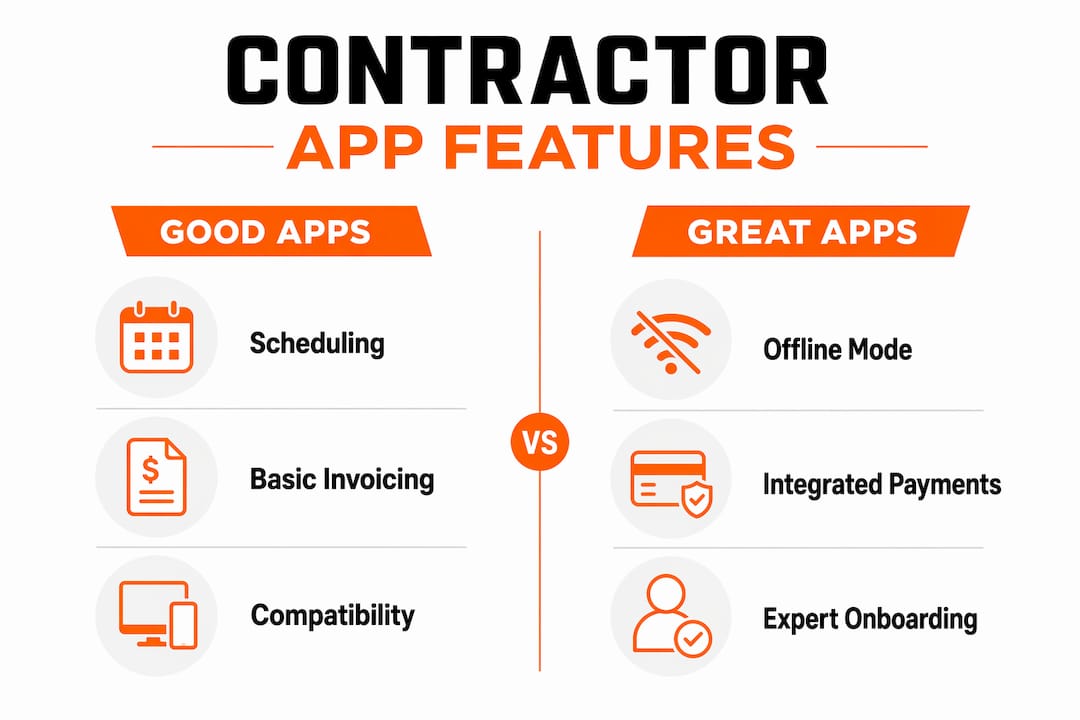
Offline functionality separates good field apps from great ones. A tool that captures signatures, photos, and invoices in a basement or rural site, then syncs when connectivity returns, keeps jobs moving regardless of signal. Security and data privacy matter too: look for apps with encrypted data storage, role-based access controls, and clear privacy policies before handing over client records.
Compatibility across iOS, Android, and web browsers is a baseline expectation now, not a bonus. Customer support and onboarding resources determine whether a team actually adopts the tool or lets it collect digital dust.
Pro Tip: Before committing to any app, run a one-week trial on a real job site with poor connectivity. If offline mode fails there, it will fail when you need it most.
How do contractors overcome resistance to new software?
Resistance to new tools is normal, especially in trades where the day starts early and there is no time for a learning curve. The key is choosing software that configures to your existing workflows rather than forcing your crew to adapt to a rigid system.

Dedicated onboarding with expert setup support is the clearest differentiator between tools that stick and tools that get dropped. When an onboarding specialist configures jobs, contacts, and accounting connections using real data from day one, the software feels familiar by the end of week one.
Mobile-friendly web apps reduce friction further by eliminating app store downloads and update cycles. A crew member who can open a browser and access a full job dashboard is more likely to use the tool consistently than one who has to manage app versions across five different phones.
Practical steps that help adoption succeed:
- Start with one feature, such as scheduling, before rolling out invoicing and payments.
- Use real job data during setup, not sample data, so the system reflects actual work from day one.
- Assign one person per crew as the point of contact for questions during the first month.
- Choose apps with in-app chat or phone support, not just email tickets, for fast answers in the field.
How Chambanow connects local contractors and hirers faster
Chambanow was built for the reality that local hiring often cannot wait. A hirer who needs a worker today does not have time to post on a general job board and wait three days for responses.
Workers create free profiles, list their skills, and set their availability so hirers can find them immediately. Hirers post jobs, browse local worker profiles, and communicate through automatic language translation, which means a Spanish-speaking worker and an English-speaking hirer can coordinate without a third party. The platform covers multiple US markets with same-day availability, and transparent subscription pricing for hirers keeps costs predictable. For contractors managing day labor needs in cities like Detroit or Portland, Chambanow’s local market pages show available workers right now, not tomorrow.
How to choose the right contractor app for your situation
The right app depends on three things: how your crew works, where they work, and how you get paid. A solo electrician billing $5,000 a month needs a different tool than a general contractor managing six crews across multiple sites.
Decision criteria worth working through:
- Business size: Solo operators benefit from lightweight tools with free or low-cost tiers. Teams of five or more need scheduling, GPS tracking, and role-based access.
- Connectivity: If your jobs regularly take place in basements, rural areas, or buildings with poor signal, offline functionality is not optional.
- Payment volume: Higher monthly card volume makes lower processing rates meaningful. A 0.3% difference in processing fees adds up quickly at scale.
- Workflow fit: Apps that require you to change how you dispatch or quote add friction. Look for tools that mirror your current process.
- Trial access: Always test during a real job, not a demo environment. A 14-day free trial on an actual site reveals problems a sales call never will.
- Pricing model: Per-user pricing scales up fast for growing teams. Flat monthly plans are easier to budget.
Key features that separate good contractor apps from great ones
The best contractor apps consolidate scheduling, quoting, invoicing, and client communication into one dashboard. Fieldwire, for example, powers over 4,000,000 jobsites worldwide by keeping drawings, task tracking, and field updates in a single platform accessible from any device. For MEP and permit-heavy projects, understanding how permit documentation fits into a project management workflow helps teams choose apps that handle document sharing and compliance tracking alongside scheduling.
How contractor apps fit into your existing workflow
Apps that require a separate login, a different data format, or manual re-entry of information already stored elsewhere add work instead of removing it. The strongest contractor management tools connect directly with QuickBooks Online, Xero, or similar accounting platforms so financial data flows automatically. GPS-based dispatch updates, automated invoice triggers after job completion, and client notification systems all reduce the number of manual steps between finishing a job and getting paid.
Why onboarding and user experience determine adoption
A contractor app with poor onboarding is a tool that never gets used. Buildertrend’s approach, for instance, pairs teams with a dedicated onboarding manager who configures the account using real contacts, vendors, and an initial live job, so the system reflects actual work from the first week. Supported onboarding programs consistently correlate with higher long-term retention because the tool feels like it belongs in the workflow rather than sitting alongside it.
Mobile web vs. native apps: what works better in the field
Modern contractor software increasingly favors mobile-friendly web apps and progressive web apps over traditional native downloads. These run from any browser, skip app store approval cycles, and integrate with device features like GPS and camera without requiring updates. Native apps still lead in push notifications and offline depth, but for hiring workflows and job management, a well-built web app often delivers the same experience with less friction.
Security and data privacy in contractor apps
Contractor apps handle sensitive information: client addresses, payment details, worker records, and contract terms. Apps should offer encrypted data transmission, role-based permissions so field workers only see what they need, and clear data retention policies. Before signing up, check whether the platform stores data on US-based servers and whether it complies with applicable state privacy laws.
How pricing models compare across contractor apps
Entry-level field apps typically start with low monthly fees for solo operators, while mid-market platforms run monthly fees for teams that vary by feature and size. Enterprise construction platforms use custom pricing. Chambanow’s hirer subscription model keeps costs transparent and predictable, which matters when hiring needs fluctuate week to week. Per-user pricing can surprise growing teams, so read the fine print before a team of three becomes a team of eight. Entry-level contractor apps generally start at approximately $29 per month, while mid-market platforms for teams are usually priced between $99 and $299 per month.
What user reviews reveal about contractor app satisfaction
User reviews consistently favor all-in-one platforms that eliminate the need to juggle multiple tools. Complaints cluster around two issues: poor mobile performance and slow customer support. Apps rated highly on G2 and the App Store tend to share one trait: they solve a specific problem well rather than trying to do everything adequately.
Device and operating system compatibility
iOS and Android coverage is standard, but web browser access matters just as much for office staff reviewing jobs from a laptop. Fieldwire supports web, iOS, and Android with no feature gaps between platforms. For hiring platforms like Chambanow, browser-based access means hirers can post jobs and message workers from any device without downloading anything.
Customer support and training resources
Phone and in-app chat support outperforms email-only systems for field teams who need answers between 7 AM and 3 PM, not the next business day. Look for platforms that offer video tutorials, a searchable help center, and a dedicated onboarding contact for the first 30 days.
Chambanow makes local hiring faster and more affordable
Chambanow is a direct path to local workers for contractors and hirers who need help today, not next week. While project management apps handle scheduling and invoicing, Chambanow solves the hiring side: finding a qualified, available worker in your market within minutes.
The platform’s bilingual design means language barriers do not slow down the hiring process. Workers build free profiles showing their skills and availability. Hirers browse, post jobs, and communicate in real time. Whether you need day laborers in Long Beach or workers in Los Angeles, Chambanow’s local market coverage puts real people in front of you fast. Check Chambanow’s pricing and post your first job today.
Key Takeaways
The most effective contractor apps combine offline capability, integrated payments, and workflow-matched onboarding to keep local workers and hirers connected without adding friction.
| Point | Details |
|---|---|
| Workflow integration first | Apps that duplicate data entry or require office callbacks get abandoned; choose tools that fit how you already work. |
| Offline access matters | Full offline job access, signature capture, and invoicing keep crews productive on low-signal sites. |
| Onboarding drives adoption | Dedicated setup support using real job data determines whether a team uses the tool long-term. |
| Pricing varies widely | Entry-level contractor apps generally start at approximately $29 per month, while mid-market platforms for teams are usually priced between $99 and $299 per month. |
| Chambanow for local hiring | Chambanow connects hirers with available local workers the same day, with bilingual communication and transparent subscription pricing. |
Recommended
Building knowledge that works.